Maintenance
Update your Virus software now if you haven't done it recently. This is a very important step of computer maintenance that is overlooked. Do this once a week to keep your computer protected against Viruses. Never operate your computer without Virus protection!
Right click on your 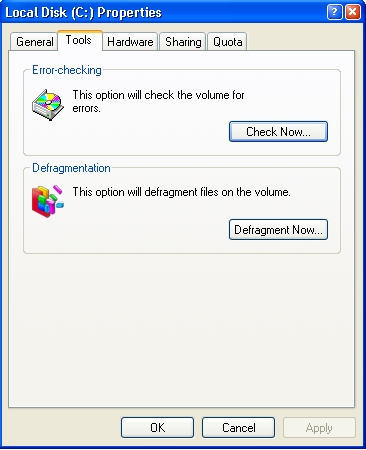  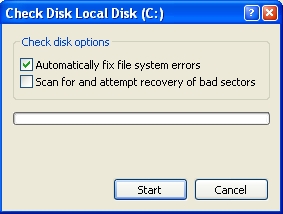  Smart Defrag Smart DefragCheck Disk options check "automatically fix file system errors". I recommend to install Smart Defrag instead of using the defragmenter that comes with XP!
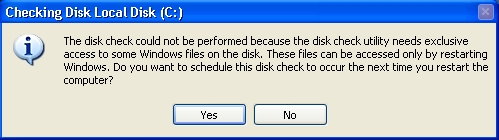
Check "Yes" to schedule a disk check the next time your computer starts.
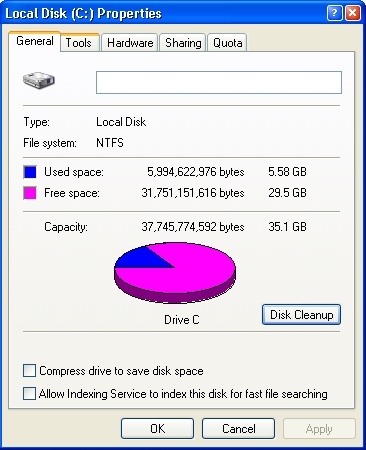 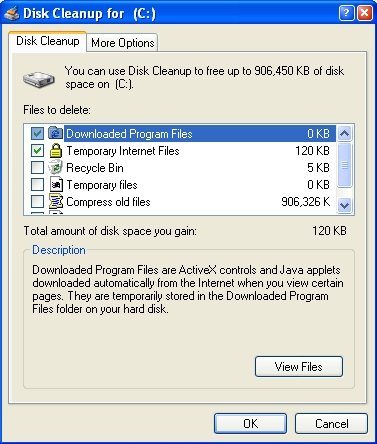 PrivaZer PrivaZer Registry Repair Registry RepairRun Disk Cleanup and check everything except for the Recycle Bin*  Unless you know what's in it! Unless you know what's in it!If you want your computer to run smoothly install PrivaZer, Registry Repair and Smart Defrag. |
 and choose properties and then Tools. There are two options available Error-checking and Defragmentation.
 If you decide to uninstall Smart Defrag your original defragmenter will be restored.